How to Modernise Legacy .NET Systems Using Azure
A practical guide for engineering teams
Legacy .NET applications often remain business-critical long after the technology around them has changed. An ASP.NET application hosted on IIS, backed by SQL Server and dependent on Windows services or shared file systems may still work perfectly well, but it can become increasingly expensive to maintain, difficult to deploy and harder to secure. Modernisation does not mean rewriting everything. In many cases the best approach is to move the application to Azure first, reduce its infrastructure dependencies and then modernise individual components where there is a clear benefit.
Modernisation is a spectrum, not a rewrite
The first decision is how far to change the application. A useful way to think about the options is as a progression from rehosting to replatforming and finally refactoring. A rehost moves the existing workload with minimal application change, often to Azure virtual machines. Replatforming removes more infrastructure responsibility by moving a web application to Azure App Service or packaging it in a Windows container. Refactoring goes further: upgrading older .NET Framework code to modern .NET, breaking tightly coupled components apart, introducing APIs, queues or background workers, and adopting cloud-native services.
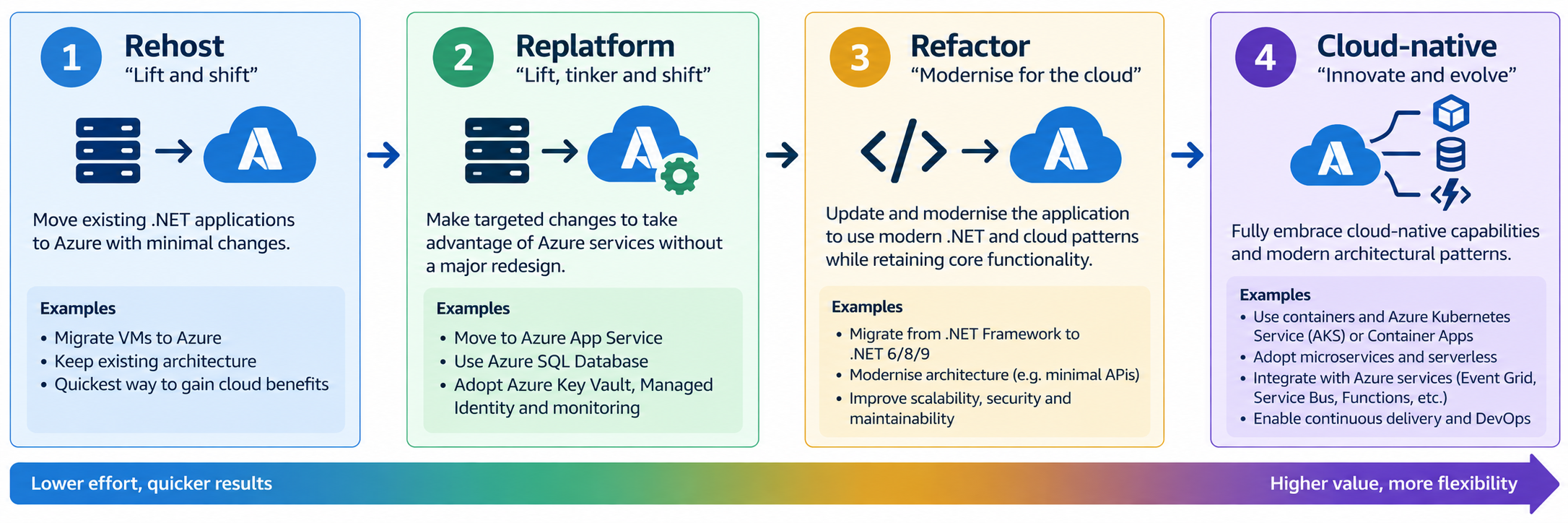
For most small engineering teams, replatforming is an attractive starting point. Microsoft provides Azure Migrate and App Service migration tooling that can discover and assess ASP.NET applications and identify blockers before migration. Many ASP.NET applications can move to App Service with little or no change, while applications with Windows-specific dependencies can be containerised and hosted using Windows containers.
A practical target architecture
A traditional application might combine the web UI, business logic, scheduled jobs, database access, authentication and configuration inside one IIS-hosted system. Azure allows these responsibilities to be modernised independently. The web application can run in Azure App Service; SQL Server data can move to Azure SQL Database or another appropriate managed SQL offering; secrets can be stored in Azure Key Vault; identity can use Microsoft Entra ID and managed identities; and telemetry can be collected using Azure Monitor and Application Insights.
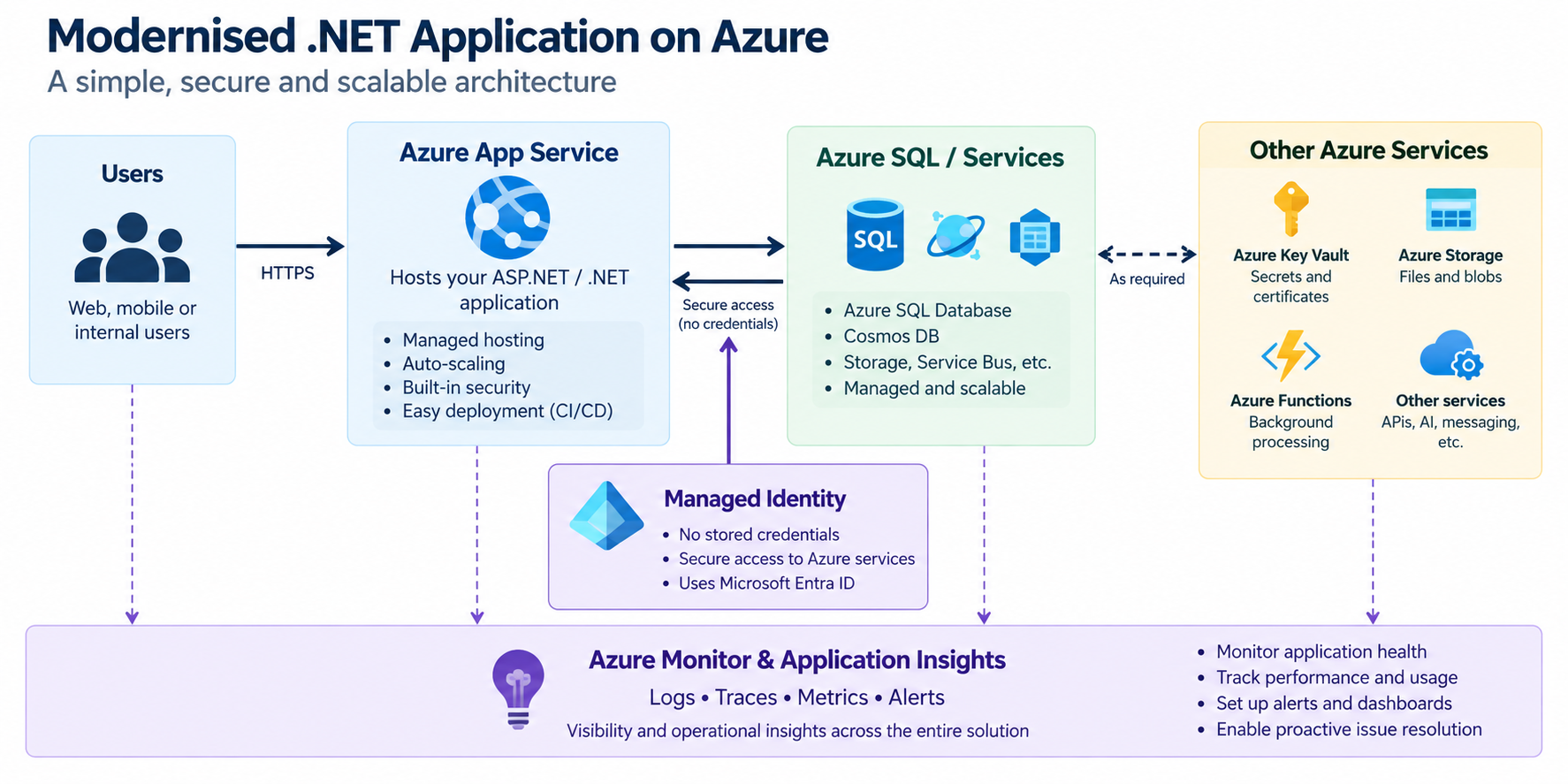
This immediately removes several operational concerns. App Service is a managed, self-patching web-hosting platform, so the team no longer needs to maintain the underlying IIS server. Managed identity can allow the application to authenticate to services such as Azure SQL, Key Vault and Storage without embedding usernames, passwords or service credentials in configuration.
Upgrade the application incrementally
Moving an application to Azure should not automatically trigger a complete framework rewrite. If the system is a large .NET Framework application, first isolate the areas that create the greatest maintenance burden. New functionality can be written in modern .NET while older components remain operational. Over time, shared libraries and services can be migrated as their dependencies permit.
For web applications already using ASP.NET Core, moving to current supported .NET versions and App Service on Linux can provide a relatively direct path to a modern platform. Older ASP.NET technologies normally require more refactoring before they can run on modern cross-platform .NET. Where an older application cannot yet be upgraded, a Windows container can provide an intermediate step: the application is packaged with its required runtime and deployed consistently while the code is modernised later.
Remove infrastructure assumptions
Legacy applications commonly assume they are running on one persistent Windows server. They may write files to the local disk, keep session state in memory, use Windows credentials, run scheduled work inside the web process or depend on machine-specific configuration. These assumptions should be identified during modernisation. Configuration should move outside the application, persistent files should use appropriate storage services, and long-running or scheduled work should be separated from the web request path.
Containerised or independently scalable background processes can be good candidates for Azure Container Apps. Kubernetes can also host modernised .NET workloads, but Azure Kubernetes Service adds operational complexity and should normally be chosen because the application genuinely requires Kubernetes capabilities—not simply because containers are being used.
Modernise security at the same time
Cloud migration is an opportunity to remove credentials and connection strings that have accumulated in configuration files. Microsoft Entra ID, role-based access control and managed identities provide a stronger model for service-to-service authentication. Key Vault remains useful for secrets that cannot be replaced by identity-based access. The principle should be simple: prefer identity over stored credentials and give each application only the permissions it requires.
Make deployment repeatable
A modernised application should also have a modern delivery process. Azure resources should be defined using infrastructure as code, and builds, tests and deployments should run through a CI/CD pipeline. Deployment slots in App Service can provide a staging environment before a release is switched into production. Application Insights and Azure Monitor then provide the telemetry needed to verify that the new version is behaving correctly.
A sensible migration sequence
- Inventory the applications, dependencies, databases, Windows services and external integrations.
- Use Azure Migrate and migration assessments to identify compatibility issues and select an appropriate Azure target.
- Move the easiest web workload to App Service first and establish CI/CD, monitoring and rollback procedures.
- Move configuration and secrets out of the application; introduce managed identity and Key Vault where appropriate.
- Modernise the data layer and remove dependencies on local server storage or machine state.
- Upgrade .NET Framework components incrementally, separating background processing and APIs when there is a clear engineering benefit.
- Measure reliability, performance and cost before deciding which remaining components justify deeper refactoring.
Avoid the 'rewrite everything' trap
The biggest risk in legacy modernisation is turning a working system into a multi-year rewrite. A cloud-native architecture is not automatically better if it introduces unnecessary services, distributed-system complexity and operational overhead. Small teams should optimise for maintainability. A well-structured modular application running in App Service with Azure SQL, managed identity, automated deployment and good observability may be a much better outcome than prematurely decomposing the same system into dozens of microservices.
Summary
Azure gives engineering teams several routes for modernising .NET systems without requiring a single high-risk migration. Start by understanding the existing application and moving it onto the simplest managed platform that meets its requirements. Then remove infrastructure assumptions, improve identity and security, automate deployment and add observability. Refactor individual components only where doing so solves a real problem. The result is a gradual transition from a server-dependent legacy application to a more secure, maintainable and cloud-ready system—while keeping the application useful throughout the process.
Microsoft guidance
- Modernize ASP.NET and ASP.NET Core web applications
- .NET migration cases for Azure App Service
- ASP.NET app containerization and migration to App Service
- Secure Azure SQL connections using managed identity