Building a C# Client for an Azure AI Foundry RAG Agent
In a previous article we created a Retrieval-Augmented Generation (RAG) agent using Azure AI Foundry and Azure AI Search. The next step is connecting that agent to a client application.
This article demonstrates how to build a simple C# console application that authenticates with Azure, connects directly to a deployed Azure AI Foundry agent, maintains conversational context, and displays responses to the user in real time.
Solution Overview
The client application performs the following steps:
- Authenticates the user with Azure Active Directory.
- Connects to an Azure AI Foundry project.
- Selects a deployed agent.
- Sends prompts to the agent.
- Maintains conversation context.
- Displays responses to the user.
Running the Application
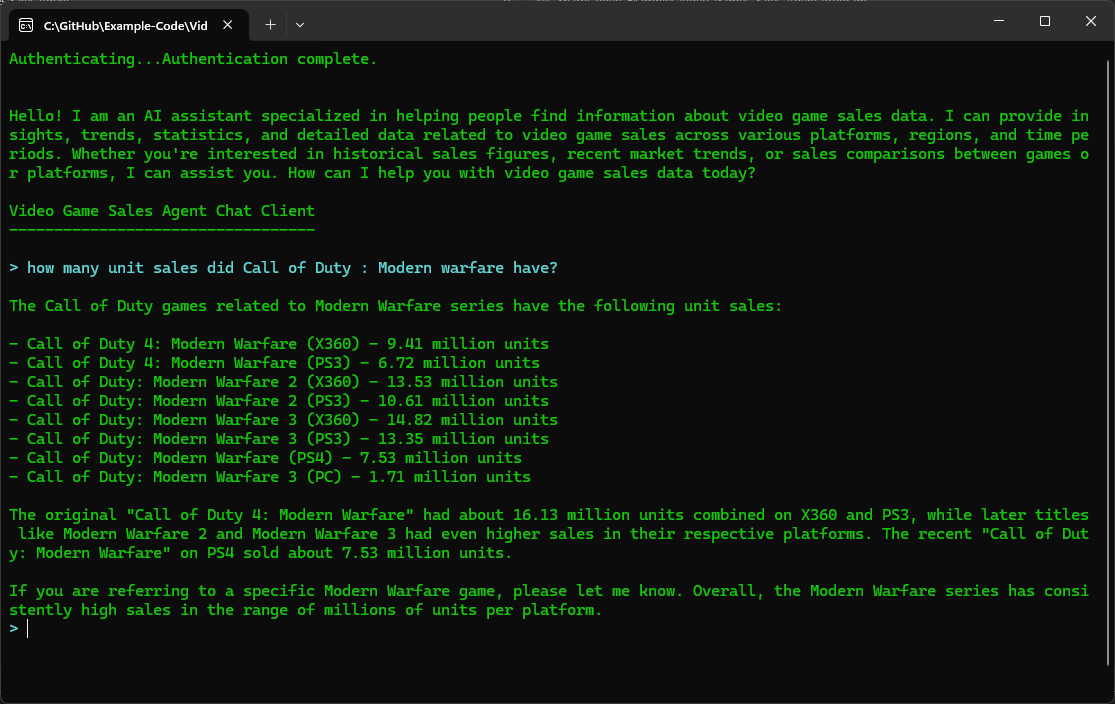
The completed application demonstrates how little code is required to integrate Azure AI Foundry Agents into a .NET application. After authentication, the client connects directly to the deployed agent and provides a simple conversational interface for querying business data.
Although this example uses a console application and video game sales data, the same approach can be applied to internal knowledge bases, engineering documentation, customer support systems, and other Retrieval-Augmented Generation (RAG) solutions. The console client serves as a lightweight proof of concept that can later be expanded into desktop, web, or mobile applications.
The screenshot below shows the application connected to the Azure AI Foundry Agent and successfully answering questions using information retrieved from the indexed dataset.
The Main Building Blocks
The console application below demonstrates the core components required to interact with an Azure AI Foundry Agent. The application authenticates with Azure Active Directory, connects to an Azure AI Foundry project, retrieves a deployed agent, accepts questions from the user, and maintains conversation context between requests.
Although the example is intentionally lightweight, the same architecture can be used as the foundation for desktop applications, web applications, internal knowledge assistants, and Retrieval-Augmented Generation (RAG) solutions built on Azure.
The complete source code for the console application is shown below. The example demonstrates authentication, project connection, agent selection, prompt submission, and conversation state management.
using Azure.AI.Extensions.OpenAI;
using Azure.AI.Projects;
using Azure.Identity;
using OpenAI.Responses;

namespace SharpCoders.Examples.Video_Games_Sales_Agent
{
    internal class Program
    {
        static async Task Main(string[] args)
        {
            // Surpress Warning About API being underdevelopment.
            #pragma warning disable OPENAI001

            // Azure AI Foundry project endpoint.
            // This identifies the Foundry project that contains the agent configuration.
            const string projectEndpoint = "YOUR_FOUNDRY_PROJECT_ENDPOINT";

            // Name and version of the deployed Foundry agent to connect to.
            const string agentName = "VideoGameSalesAgent";
            const string agentVersion = "2";

            // InteractiveBrowserCredential displays a browser-based login prompt.
            // This is convenient for local development because it allows the user
            // to select the Azure account that has access to the Foundry project.
            var credential = new InteractiveBrowserCredential();

            Console.ForegroundColor = ConsoleColor.Green;
            Console.Write("Authenticating...");

            // Force authentication before the chat loop starts.
            // Without this call the login prompt would not appear until the first
            // request is sent to the agent, resulting in a poor user experience.
            await credential.GetTokenAsync(
                new Azure.Core.TokenRequestContext(
                    new[] { "https://cognitiveservices.azure.com/.default" }));

            Console.WriteLine("Authentication complete.");
            Console.WriteLine();
            Console.WriteLine();

            // Create a client for communicating with the Azure AI Foundry project.
            AIProjectClient projectClient =
                new(new Uri(projectEndpoint), credential);

            // Create a reference to the specific agent instance that will answer
            // user questions.
            AgentReference agentRef =
                new AgentReference(agentName, agentVersion);

            // Obtain a response client that routes requests to the selected agent.
            ProjectResponsesClient responseClient =
                projectClient.ProjectOpenAIClient
                             .GetProjectResponsesClientForAgent(agentRef);

            // Send an initial prompt to verify connectivity and retrieve a short
            // description of the agent's capabilities.
            ResponseResult response =
                responseClient.CreateResponse("Tell me about yourself?");

            Console.WriteLine(response.GetOutputText());
            Console.WriteLine();

            Console.WriteLine("Video Game Sales Agent Chat Client");
            Console.WriteLine("----------------------------------");
            Console.WriteLine();

            string? previousResponseID = null;

            // Main chat loop.
            // Continue accepting questions until the user enters a blank line.
            while (true)
            {
                Console.ForegroundColor = ConsoleColor.Cyan;
                Console.Write("> ");

                var prompt = Console.ReadLine();

                // Exit the application when the user presses Enter without
                // supplying a question.
                if (string.IsNullOrWhiteSpace(prompt))
                    break;

                Console.WriteLine();

                // Send the user's question to the agent and wait for a response.
                // Send the previous response ID to maintain the state of the conversation.
                response = responseClient.CreateResponse(prompt, previousResponseID);

                // Keep track of previous response ID.
                previousResponseID = response.Id;

                // Display the agent's answer.
                Console.ForegroundColor = ConsoleColor.Green;
                Console.WriteLine(response.GetOutputText());
            }
        }

    }
}
Foundry versus simply using Azure OpenAI
If an application only needs to send a prompt to a model and receive a response, a direct model call may be all that is required. Foundry becomes more valuable as the system grows: multiple models, agents, retrieval, tools, evaluation, observability and governance can be managed as parts of the same platform. Microsoft also supports upgrading existing Azure OpenAI resources to the newer Foundry resource model while preserving existing endpoints and state.
A sensible adoption path
- Start with one concrete engineering use case and make a simple model call.
- Create a small, representative evaluation set before adding complexity.
- Add company knowledge through retrieval only where the use case needs it.
- Introduce an agent when the application genuinely needs tools or multi-step orchestration.
- Add tracing, monitoring, RBAC and network controls before moving into production.
- Treat prompts, agent instructions and evaluation datasets as versioned engineering assets and deploy them through a repeatable CI/CD process.
Where Foundry fits - and where it does not
Foundry is most useful when an organisation wants to build production AI applications on Azure and needs a managed path from experimentation to operation. It does not remove the need for normal software architecture: the application still needs well-designed APIs, data ownership, authentication, testing, logging and cost controls. Likewise, an agent should not be added simply because it is available; deterministic application code is usually better for tasks that have fixed rules and predictable inputs.
Summary
In this tutorial we created a simple C# console application capable of connecting directly to an Azure AI Foundry Agent. The application authenticates with Azure Active Directory, connects to a Foundry Project, maintains conversational context, and displays responses from a Retrieval-Augmented Generation (RAG) agent in real time.
Although the example is intentionally lightweight, the same architecture can be extended to support desktop applications, web applications, internal knowledge assistants, and customer-facing AI solutions. Azure AI Foundry provides the agent infrastructure while .NET provides the flexibility to integrate those capabilities into existing business systems.
Further Reading
- Microsoft Learn - Azure AI Foundry Documentation
- Microsoft Learn - Azure AI Foundry Agents Overview
- Microsoft Learn - Azure SDK for .NET
- Microsoft Learn - Azure Identity Client Library
- Microsoft Learn - Vector Search in Azure AI Search