Multi-Threaded C# UI Design
Abstract
This Sharp Coders White Paper explains the correct way to update a UI when working with slow processes by using Asynchronous delegates to do the work on a different thread and then marshalling a periodic progress update from the slow process onto the UI thread to update the progress bar.
The .NET form control “ProgressBar” like many other .NET form controls is intuitive to setup and use. The “ProgressBar” is meant to provide a visual queue to the user that a slow process is still progressing. Executing a time consuming task (such as loading a very large file) if executed in one thread will lock the UI for the duration of the task preventing updates to the progress bar from being displayed.
Different solutions to this problem exist but the correct way to do this is to use a .NET Asynchronous Delegate to execute the slow process on a different thread. This frees the UI thread to keep updating the UI. Then a second delegate can be used to indicate periodic progress and this can be used to update the progress bar.
Example – Part 1 Running on a different thread.
This example shows a simple C# program that has a windows form, a progress bar and two buttons. The two buttons both run the same slow task but one button executes it on the UI thread (thread the form is running on) and the other using asynchronous delegates executes it on a separate thread.
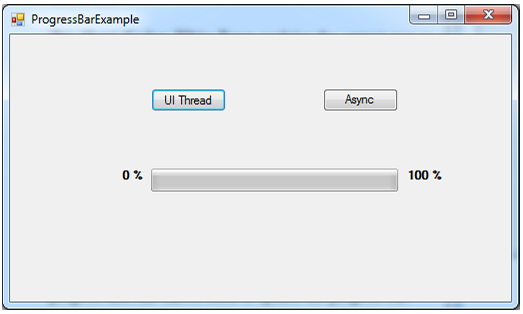
For the example the processor intensive process is simulated by the “IamTheWorkerMethod” as seen below. It executes a “for loop” 50 times calculating the square of the index of the “for loop”.
/// <summary>
/// This method is the slow processor consuming task. It sits in a loop
/// computing the square of 1,2,3,4,5,6,7,8,9,... It prints its progress to
/// the console so progress can be seen when running it in debug mode in
/// visual studio even when the method is run on the UI thread.
/// </summary>
public void IAmTheWorkerMethod()
{
    int Result;
    int LoopNum = 50;

    for (int i = 0; i < LoopNum; i++)
    {
        Result = i * i;
        Console.WriteLine("I : " + i + "/" + LoopNum);

        Thread.Sleep(100);
    }
}
The button with the label “UI Thread” executes the “IamTheWorkerMethod” method in the same thread as the UI thread causing to the UI to freeze for a few seconds. This can be seen if you press the button and try and move the window.
/// <summary>
/// Method that executes whenever someone clicks on the "UI Thread" button.
/// It then calls the the IamTheWorkerMethod() method running it on the
/// current thread( UI thread ).
/// </summary>
/// <param name="sender">The reference to the button
/// (ExecutesOnUIThreadButton) that raised this event.</param>
/// <param name="e">Contains event-specific values.</param>
private void ExecutesOnUIThreadButton_Click(object sender, EventArgs e)
{
    try
    {
        IamTheWorkerMethod();
    }
    catch (Exception ex)
    {
        MessageBox.Show(ex.Message);
    }
}
To execute the “IamTheWorkerMethod” on a different thread and allow the UI thread to redraw during execution of the slow process the second button labelled “Async” uses .NET’s “BeginInvoke” method to execute the method “IamTheWorkerMethod” on a different thread.
First we add a delegate and then subscribe the “IamTheWorkerMethod” to it in the constructor.
// Define a new delegate and create a member variable of type
// WorkerDelegate.
public delegate void WorkerDelegate();
public WorkerDelegate theWorkerDelegate;

/// <summary>
/// Constructor for the Form1 class. It initialises the forms controls and
/// subscribes to a number of events.
/// </summary>
public Form1()
{
    InitializeComponent();

    // Subscribe to the WorkerDelegate
    theWorkerDelegate += new WorkerDelegate(IamTheWorkerMethod);
}
Then a method is added which executes when the button “Async” is pressed. This does the job of running the IamTheWorkerMethod on a different thread.
/// <summary>
/// This method calls begininvoke on anything that is implementing the
/// WorkerDelegate which in the program is the slow process
/// ( IamTheWorkerMethod ). BeginInvoke causes the execution to take place
/// on a different thread.
/// </summary>
/// <param name="sender">The reference to the button
/// (ExecutesUsingAsyncDelegateButton) that raised this event.</param>
/// <param name="e">Contains event-specific values.</param>
/// <param name="e">Contains event-specific values.</param>
private void ExecutesUsingAsyncDelegateButton_Click(object sender, EventArgs e)
{
    try
    {
        // Call begininvoke which executes the delegate on a different
        // thread only if the delegate has been subscribed too. (ie not
        // null)
        if (theWorkerDelegate != null)
        {
            // Resultreturned is a method that will be called when
            // the method implementing the theWorkerDelegate
            // completes.
            theWorkerDelegate.BeginInvoke(new
            AsyncCallback(Resultreturned), theWorkerDelegate);
        }
        else
        {
            //Console.WriteLine( "Error : Not subscribed!!!" );
            throw new ApplicationException("Error : Not  subscribed!!!");
        }
    }
    catch (Exception ex)
    {
        // Display any thrown exceptions to the user in a message box.
        MessageBox.Show(ex.Message);
    }
}

/// <summary>
/// This method is called once the asynchronous delegate has returned.
/// </summary>
/// <param name="iar">Represents the status of the asynchronous operation.
static public void Resultreturned(IAsyncResult iar)
{
    // Called on completion of the IamTheWorkerMethod when it is being
    // implemented by a delegate that is being called Asynchronosly.
    Console.WriteLine("In method resultreturned. Result Is Complete := "  + iar.IsCompleted.ToString())
}
Example – Part 2 Updating the Progress Bar by Marshalling
Running the code above and pressing “Asyn Button” will allow the UI thread to redraw the screen while the slow task it executing. Now we want to provide a visual queue to the user as to the progress of the slow task. This is achieved by calling a method that sets a value on the progress bar control. However operations on UI controls must take place on the thread that created them.
As we ran the slow process on a different thread using asynchronous delegates we need to pass the process of updating the progress bar back to the UI thread. This process is referred to as marshalling and is achieved by using the .NET method invoke().
First we add a new delegate called “Progress_Tick_EventHandler” as follows:
// Delegate to notify when an a certain amount of work has been done as
// inicated by progress.
public delegate void Progress_Tick_EventHandler(int progress);
static public Progress_Tick_EventHandler theProgressBarTickDelegate;
and modify the constructor to subscribe to the event and modify the “IamTheWorkerMethod” to call the delegate with a percentage progress:
/// <summary>
/// Constructor for the Form1 class. It initialises the forms controls and
///  subscribes to a number of events.
/// </summary>
public Form1()
{
    InitializeComponent();

    // Subscribe to the WorkerDelegate
    theWorkerDelegate += new WorkerDelegate(IamTheWorkerMethod);

    // Subscribe to "Progress_Tick_EventHandler".
    theProgressBarTickDelegate += new Progress_Tick_EventHandler(SafeProgressBarUpdate);
}

/// <summary>
/// This method is the slow processor consuming task. It sits in a loop
/// computing the square of 1,2,3,4,5,6,7,8,9,... It prints its progress to
/// the console so progress can be seen when running it it debug mode in
/// visual studio even when the method is run on the UI thread.
/// </summary>
public void IamTheWorkerMethod()
{
    int Result;
    int LoopNum = 50;
    for (int i = 0; i < LoopNum; i++)
    {
        Result = i * i;
        Console.WriteLine("I : " + i + "/" + LoopNum);

        // If Anyone has subscribed notify them with a %progress of our
        // progress through the for-loop.
        if (theProgressBarTickDelegate != null)
        {
            theProgressBarTickDelegate((100/LoopNum)*(i+1));
        }

        // Allow other processes to get access to the processor.
        System.Threading.Thread.Sleep(100);
    }
}
We then need to add a new method that updates the progress bar that will be executed when the “theProgressTickDelegate” is fired. This is achieved by the “SafeProgressBarUpdate” method below:
/// <summary>
/// This method determines if the thread calling this method was the one
/// that created the progressbar control. If it is not then it marshals the
/// call onto the thread that did control via the "SafeUpdate
/// ProgressBarDelegate". If it is on the correct thread then it calls
/// another method ProgressBarUpdae that does the actual update.
/// </summary>
/// <param name="progress">A value in representing the % of progress that
/// the progress bar should be set to.</param>
private void SafeProgressBarUpdate(int progress)
{
    // ask the control if we are on its UI thread
    if (progressBar1.InvokeRequired)
    {
        //we are not, so an invoke is required.
        progressBar1.Invoke(new SafeUpdateProgressBarDelegate(
                            ProgressBarUpdate), new object[] { progress });
    }
    else
    {
        // We are on the UI thread, we can directly modify the control
        ProgressBarUpdate(progress);
    }
}
The SafeProgressBarUpdate method checks to see if the thread that created the control is the one that is currently executing by calling the .NET property “InvokeRequired” on the progress bar control. If it returns true then the update needs to be marhsalled onto the thread that created the control. Calling invoke on the progress bar control causes the sepcified delegate( in this case “SafeUpdateProgressBarDelegate” ) to execute on the thread that created the progress bar control. In this case a method “ProgressBarUpdate” executes when the delegate is fired and updates the progress bar control safely and on the correct thread.
/// <summary>
/// This method updates the progress bar and should only be called from
/// SafeProgressBarUpdate as it has to be on the UI thread to do the
/// update.
/// </summary>
///  < name="progress">A value in representing the % of progress that
/// the progress bar should be set to.</param>
private void ProgressBarUpdate(int progress)
{
    progressBar1.Value = progress;
}
Further reading
- Video How to: Create a C# Windows Forms Application
- Asynchronous Programming Overview
- About Progress Bar Controls
- Control.Invoke Method